gchat-0: The Origin Story
2026-05-20
To run my own LLM training experiments, I built an end-to-end training stack from scratch: a nanochat-style trainer on JAX and TPUs, a CLI for on-demand compute, and an observability pipeline to track every run. Check out the code here.
Motivation
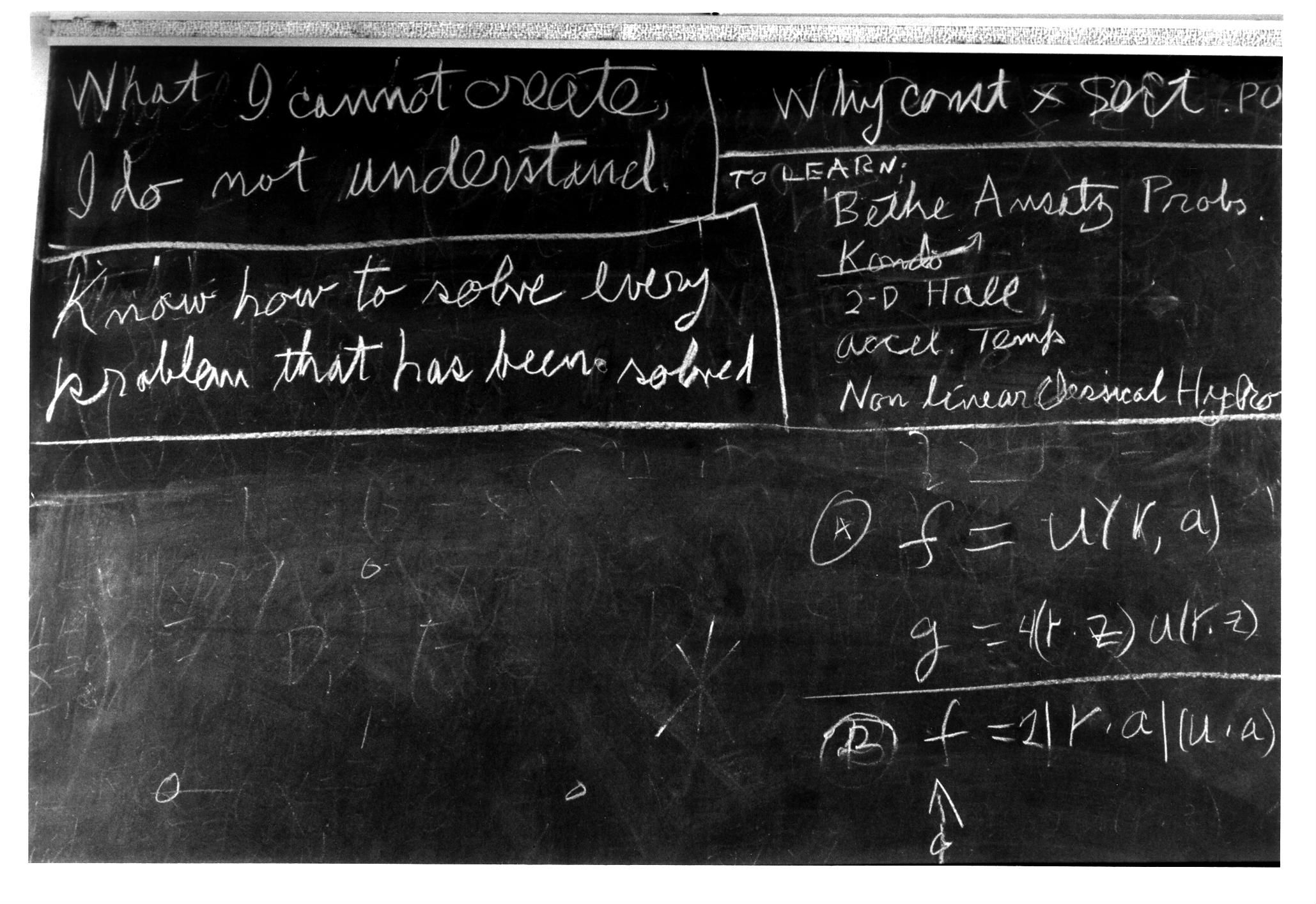
"What I cannot create, I do not understand. Know how to solve every problem that has been solved."
— Richard Feynman
This image and quote have been burned into my brain since my time as a Physics undergrad. The idea that the only way to fully understand something is to build it yourself is core to the way I think about learning new things. This is the ethos that led me to work on building my own AI training stack from scratch and use it as a jumping-off point to try my own ideas.
I first got interested in ML back in 2019. During that time, I was renting GPUs from AWS to run little experiments like training VAEs on tiny images of Pokemon, trying to get neural nets to identify gravitational waves, and attempting to fine-tune GPT2. Funny enough, back then I didn't think that kind of work had great career prospects, and I've since spent most of my career working on distributed systems and infrastructure. After moving to San Francisco last year and regularly attending the 90/30 reading group, I gained a renewed interest in AI research.
Oftentimes, we'd read papers and I'd have ideas of things I'd like to try, but I had no good starting point for trying them out. No starter code, no access to compute, nada. If you want to experiment with LLM pretraining techniques, for example, it makes sense that you need to start with some code that does LLM pretraining which you understand deeply. gchat and the surrounding infrastructure I am building are my solution for that.
In this blog I'll talk about the research setup I am building and the specifics of the gchat model and its training loop.
My Research Setup
To be able to quickly try out new research ideas, I think you need three things: a reusable codebase, simple compute orchestration, and solid observability.
A Reusable Codebase
Most research ideas are incremental improvements on existing methodologies or techniques, so it's helpful to have a baseline training pipeline already implemented to build those improvements on. There are also things that are common across different research projects that you would like to reuse which you can write your own libraries for; things like observability, layers, kernels, checkpointing, etc. To reconcile these two things, I keep all of my AI research code in a monorepo I call gaia. It contains packages for the aforementioned reusable utilities and then individual directories for the projects I am working on, of which gchat is one. This makes code reuse trivial but also makes it more convenient for use with coding agents since they have the context of all of your research code in a single place.
gchat is intended to be my reusable codebase for training LLMs. The goal is that it can easily be branched to try new ideas across the entire training pipeline, from data selection and tokenization to post-training and everything in between. I intend to keep the main branch as a fairly vanilla, single-node setup to be used as a consistent baseline. Large changes and their sweeps can live in git branches; for example, trying out and extending new techniques like Manifold-Constrained Hyper-Connections or Token Superposition will be in their own branches. Branches also make it clear how ideas are linked hierarchically through their git history. I haven't tried this yet, but I think it will make it easier to compose different techniques and run ablations without polluting the codebase with tons of branching logic which, in my opinion, makes the code much less readable.
Simple Compute Orchestration
Okay, so now we have a reusable codebase that we want to run experiments with, but if you're like me and don't have persistent accelerated compute available to you, there's a bunch of annoying work you need to do before you kick off your training run and kick your feet up to watch the loss go down.
First you have to find some provider that has the compute you need (e.g. 8xH100 or v5p-4x2), then you need to go onto their site or use their API to provision it, then you need to set up your SSH keys, copy your code over, maybe add your git credentials if you want to iterate and debug on the box, you need to generate or copy the data to it, then kick off training, and finally don't leave it on if you're not using it so you don't burn your money. The problem is even worse if you want to train on multiple nodes at once—now you have to deal with orchestration systems like SLURM or Kubernetes. Even if they are pre-installed, they likely need some helm charts or extra configuration for you to be able to get going. This is the headache of orchestrating on-demand compute.
gml is the compute orchestration system I am building to solve this problem for myself. It's a CLI intended to be used to quickly spin up/down on-demand compute across cloud providers. Currently it supports single nodes. It does everything I listed above with two commands:
gml node create --instance-type "v6e-1" --provider google --timeout 3hr
gml connect <instance-id>
The idea is to implement a backend for each provider I want to use by leveraging their public APIs. Currently gml supports Lambda and TPUs on GCP.
Once I start scaling to multiple nodes, I plan to add support for spinning up Kubernetes clusters with my own custom k8s operator/scheduler stack for orchestrating training jobs. There are existing projects like the Volcano Scheduler, KAI, and Kueue that aim to solve the problem of orchestrating jobs on a shared cluster, but I think these are a bit overkill for my single-tenant, ephemeral use case. Plus, the whole point is to build as much of the stack myself so that I fully understand it (and also it's more fun that way).
Observability
Okay, so you have some code to run and you have some compute to run it on, but these jobs take hours if not days—how do you keep track of how things are going without sitting there and staring at the logs on your terminal?
I have a package called gaia-metrics which wraps OpenTelemetry Metrics into a simple API that can be used in the training loop for asynchronously pushing metrics to an OpenTelemetry Collector. I self-host an OpenTelemetry Collector, ClickHouse, and Grafana stack on my gnode project with a custom schema tuned for efficiently querying training metrics for a particular training run. You can see the code for the components in the pipeline here.
By storing all of the raw metrics in my own stack, I have full control over how I query and display them as well as being able to use them for downstream tasks later like autoresearch flows or comparative analysis. I also made all of the Grafana dashboards public with read-only permissions so they are easy to share with others.
gchat
gchat is a GPT-style LLM training repo based on Andrej Karpathy's nanochat. It is written in Jax for training on TPUs with data streamed from GCS buckets.
A natural first question might be: why did I choose Jax and TPUs over PyTorch and GPUs? The short answer is: why not? The longer answer is:
- From a pedagogical perspective: Rewriting nanochat in PyTorch would not have been as much of a learning exercise as the Jax implementation because not only was I forced to learn how Jax is different from PyTorch (which helps you understand both better), I had to think about every line I was writing to make sure I was doing roughly the same thing in gchat as nanochat.
- From a technical perspective: I was inspired to look more into Jax + TPUs after reading How To Scale Your Model and learning about the elegant way in which Jax is capable of distributing computations via the XLA compiler and GSPMD. My current mental model is that GPUs and CUDA offer you more flexibility than TPUs and XLA, but the rigidity of the TPU/XLA stack means that the compiler is capable of getting you pretty far automatically.
- From a market perspective: After reading the SemiAnalysis post on TPUs, seeing the Anthropic deal for one-million TPUs, and noting that Google is starting to sell TPUs externally, I think TPUs will continue to become more important in the AI ecosystem as time goes on, and thus spending time understanding the stack better is a good use of time.
I opted to base gchat on nanochat because it allows for exploration of every part of the LLM training process without requiring too much compute to post a result. The main leaderboard tracks how quickly you can train a model to GPT-2 quality in terms of two metrics: validation bits-per-byte and the DCLM-CORE eval set. As of this writing, the leading run took 1.65 hours on an 8xH100 node and cost about $50. This is something quick and cheap enough to be both fun and not cost-prohibitive for someone working independently like me.
Now we can dive a little deeper into the training setup.
Data Pipeline
Before training, something has to turn text into tokens. gchat.data.download downloads ClimbMix shards using the same indexing scheme as nanochat, tokenizes with the standard GPT-2 tokenizer, and emits tokens-*.arrayrecord plus token_bytes.npy for byte-level evals (bits-per-byte). I use arrayrecords for more efficient distributed reads. They seem to fit more natively into the Jax/Flax/Grain/Optax stack of training libraries.
Upload scripts push the result to GCS so the TPU VM never has to hold the full corpus locally—it just streams the data on-demand during training. This prevents wasting time building/pulling the dataset onto each new VM. One caveat to this is that if the GCS bucket is not in the same region as the VM, then reads could become slow from network latency and leave the TPU starved. The golden rule is to keep MFU as high as possible, and depending on asynchronous fetching and model size, this might not be the bottleneck yet, but keeping the data in the same region as the VM is the safe bet. The annoying part about this is that you might upload data to a bucket in one region and then not be able to get TPU capacity in that region. In that case, it makes sense to re-upload the data to the region in which you can get capacity. The good news is that if you are not changing the dataset often, then this cost is amortized across training runs.
Model Architecture and Scaling Dashboard
The architecture of gchat is a fairly standard modern GPT-style LLM using Multi-Head Attention, RoPE, SwiGLU, and pre-norm on the Transformer blocks. I opted to leave out Muon and Resformer from the baseline implementation for simplicity, although they are present in nanochat.
After a few XLA OOM errors, I built a "scaling dashboard" to sanity-check model shape vs. HBM and rough TPU training time before committing to a run. It estimates parameter count, activation memory, AdamW state, and whether a replica fits on various TPU SKUs, using the same Chinchilla-style FLOPs heuristics from nanochat and the computations from How To Scale Your Model. You can see it here. It's been helpful so far when trying to pick the smallest possible chip to launch my initial runs on for testing, but it definitely needs to be calibrated to be more accurate to the model architecture and hardware. Nonetheless, I feel it's a good starting point.
Training loop
The core trainer is a single-device JAX program using Flax NNX and Optax. It streams pre-tokenized ArrayRecord shards from a local path or gs:// URI via Grain, mirrors nanochat's speedrun hyperparameters where possible, and writes checkpoints back to GCS when configured.
A one-command entry point wraps the details and can be used to configure hyperparameters:
bash gchat/speedrun.sh
First Training Run
Finally, after a few months of working on this in my spare time, I was able to get an end-to-end run going. I trained a smaller version of the model on a single TPU v6e. You can see the training dashboard here.
The loss curve has the right shape, but unfortunately it plateaued very early and I aborted the run after only about 3 hours. I set it up to just run BPB validation loss computation at the end of pretraining, but I quit before then because the loss flattened out. Although the model didn't train to the desired loss, I was glad to finally get something running as a first full test. From here, there's only room to improve—or, in terms of loss, only room to go down.
What's Next
Now that I have things working end-to-end, I can start making tweaks. I have the following things in mind right now, roughly in order:
- Upgrade training to be Fully-Sharded Data Parallel on 8 TPUs so that I can match the hyperparameters of nanochat (namely depth 24 and larger batch size and sequence length) and hopefully get closer to the established baseline.
- Tweak the learning rate schedule of Adam
- Add the Muon optimizer
- Add mHC
- Try MoE layers
- Train my own tokenizer
- ... and many more
Summing It Up
I implemented something similar to nanochat in Jax which I call gchat. I train it on TPUs provisioned with my tool gml and it sends metrics to an observability stack I built and run on my own infrastructure (gnode). This is my starting point for running more of my own AI research experiments and learning how to optimize training on the Jax/TPU stack. I plan to keep posting my findings in this blog series as I go, so stay tuned.